


Al Quran : Holy Quran Offline
4.627.00 Reviews
App Specs
- Version
- 1.7.2
- Updated On
- License
- Free
- Downloads
- 1,000,000+
- Developer
- genie islam
- Categories
- Libraries & Demo
- Platform
- Android
Screenshots



 Analysis by AppCompare
When I first opened Al Quran : Holy Quran Offline, I wanted a simple answer to one question: could I read or listen without making an internet connection part of the routine? That is the main appeal here. This is a free Quran app from genie islam, listed in the Libraries & Demo category, and it is aimed at people who want the text close at hand rather than a complicated study dashboard. I would approach it as a practical reading and listening companion, while remembering that the best fit depends on how you prefer to engage with the Quran.
First Impressions
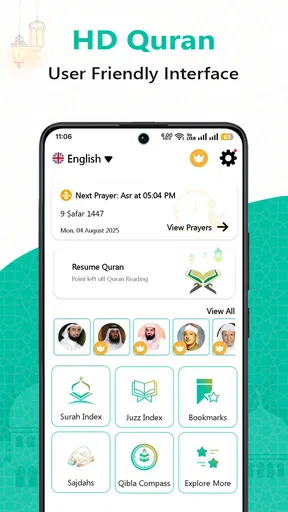
First things first, downloading Al Quran : Holy Quran Offline was a breeze. The app doesn’t take up much space, which is great because I know how precious storage can be on our devices. Once you open it, you’re greeted with a clean and simple interface. No frills, no fuss. It’s all about getting you to the content you want to read. The text is clear, and the navigation is intuitive.
What to Expect from the Reading and Listening Experience
The app’s central promise is convenient access to Quran reading offline, alongside online MP3 listening. In practice, that makes it most useful when I want the written text available without relying on a live connection, but I should plan for internet access when I want to stream recitation. Those are related uses, but they are not identical: offline reading can be part of a travel routine, while listening online depends on connectivity and can be less dependable in a tunnel, on a weak network, or when I am trying to conserve mobile data.
The app has an average rating of 4.6 from around 29,000 ratings, and it has been installed over a million times. Those figures suggest that many people have found it useful, but they don’t tell me whether its reading presentation suits my own habits. I would spend a few minutes checking the text size and finding a familiar passage before relying on it as my only reading option.
Its age rating is Everyone, so it is broadly suitable for general audiences. The app is free to install, with optional in-app purchases listed from $1.49 to $15.99 per item. I would treat the free version as the sensible place to start and check the purchase details in the app before buying anything, especially if I only need basic reading and occasional listening.
First Setup: Make the First Session Easy
For a first-time user, I would keep setup deliberately simple. Open the app when you have a steady connection, look around the reading screen, and adjust the font size until it is comfortable. If you want to read somewhere you may be offline, verify that the Quran content is available before leaving home rather than waiting until you are on a train or away from Wi-Fi. That small check can prevent the frustrating discovery that a feature you expected to work offline still needs preparation.
The app was released on February 10, 2022, and its current version is 1.7.2, with Android 8.0 as the minimum operating system. If you are helping a family member set it up, checking that their device meets that requirement is a more useful first step than troubleshooting the app after installation. The developer is genie islam; I would also make sure I am choosing the intended Quran app when searching, since short names can be easy to confuse.
Worth Reading Before You Choose

Baby Panda World Brings Quick Play to Modern Phones, but Its Game Library Feels Busy

ESPN’s Live Game View Makes Following Close Games Easier

QuizzLand Review: A Good Fit for Short Trivia Breaks, Not Every Player

Basketball Stars: Multiplayer Is Fast, but Can It Recover When Matches Go Wrong?

WEBTOON Turns Phone Updates Into a Better Reading Routine

Link to Windows Runs on Shared Habits, Not Social Feeds
One practical choice is to decide what you want from the first session: uninterrupted reading, a recitation to listen to, or a passage to revisit later. Trying all three at once can make a straightforward app feel less clear than it is. I find it easier to begin with one short reading session, then test the audio separately so I can tell whether any connection issue is with streaming rather than the text.
Diving Into the Features
One of the standout features here is the offline access. You download the Quran once, and you're good to go without needing any internet connection. This is super handy for those times when you're on the move or in places with spotty service.
The app also includes several translations and recitations. You can choose from a variety of languages, which makes it inclusive and accessible to a wider audience. Personally, I found the audio recitations to be a lovely touch. They really enhance the experience, especially when you’re on a long commute or just relaxing at home.
For a realistic everyday routine, I would use the reading side for a brief quiet moment before leaving in the morning, then return to the same place later with a bookmark. If I want to listen during a commute, I would test the online audio at home first and decide whether it is reliable enough for that route. This is a small but useful distinction: a reader can prepare for an offline journey, whereas a listener using online MP3 recitation should expect the experience to depend on signal and data availability.
Customization at Your Fingertips
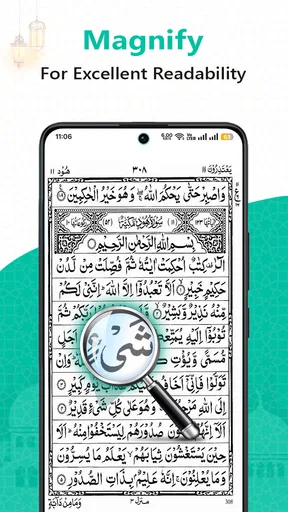
Customization is key in any app, and this one doesn’t disappoint. You can adjust the font size for easier reading, which is a lifesaver if you’re like me and sometimes forget your glasses. The app also lets you bookmark verses—great for picking up right where you left off or saving a favorite verse for reflection later.
Another neat feature is the night mode. It’s easy on the eyes and perfect for late-night reading. Just a tap, and you can switch between modes, ensuring a comfortable reading experience no matter the time of day.
A useful habit is to treat bookmarks as personal waypoints rather than a replacement for notes. I can save a verse I want to return to, but if I am studying a topic over several sessions, I would keep a separate note about why I saved it. That makes the bookmark more meaningful when I come back, especially if I have collected several passages and no longer remember what prompted each one.
Common Confusion: Offline Text Versus Online Audio
The wording around offline reading and online listening can lead a new user to assume that every part of the experience works without a connection. I would not make that assumption. The reading access is intended for offline use, while online MP3 listening naturally needs an active connection. If the text opens but audio does not play when the phone is offline, that is not necessarily a fault; it may simply be the difference between the two ways of using the app.
Likewise, a selection of translations and recitations is helpful, but it does not mean every reader will find the exact language, reciter, or study tools they prefer. Before building a daily routine around it, I would check the available choices directly. If your needs are specific—for example, you rely on detailed commentary, advanced study organization, or a particular recitation—an app designed around those needs may be a better companion.
There is also a practical trade-off in using a single phone for both reading and listening. Notifications, incoming calls, and battery use can interrupt a focused session, and streaming audio may consume mobile data. I would use a quiet setting or offline reading when concentration matters most, and save online listening for a dependable connection. These are ordinary phone constraints, but they matter more when the goal is an uninterrupted devotional routine.
Usability and Performance
In terms of performance, Al Quran : Holy Quran Offline runs smoothly. I didn’t encounter any lag or crashes, which is always a plus. The navigation is straightforward; even if you’re not tech-savvy, you’ll have no trouble finding your way around.
I also appreciate the search functionality. It’s pretty robust, allowing you to find specific verses or topics quickly. This is super helpful for study sessions or if you’re looking to share a particular verse with a friend.
Search is most valuable when I have a clear phrase or subject in mind; it is less of a substitute for browsing when I am not sure what wording to use. A good workflow is to search first, read the surrounding passage rather than stopping at a result, and bookmark the verse only if I genuinely expect to revisit it. That helps keep a quick lookup from turning into a disconnected collection of search hits.
Compared with the usual alternatives, this app is a straightforward option for carrying Quran text and accessing recitation, rather than a broad religious library or a dedicated academic reference tool. A printed copy remains a good choice for anyone who wants a screen-free reading session or prefers paper navigation. A streaming audio service may be more convenient for someone whose main priority is listening and who has a reliable connection, while a more specialized Quran study app may suit readers who need deeper annotation or structured lessons. I would choose this one when uncomplicated access and offline reading matter more than an extensive suite of study functions.
Who It Suits, and When I Would Look Elsewhere
I think it is a good fit for someone who wants to keep Quran reading available on a phone, especially if their routine includes travel, brief breaks, or places where internet access is uncertain. It can also work for a reader who likes to switch between text and recitation, provided they understand that online listening and offline reading have different connection needs. The adjustable text and night mode make it easier to adapt a session to different lighting and reading comfort.
I would look elsewhere if I needed a highly structured learning course, extensive commentary, or a particular set of research tools. I would also avoid relying on the online audio as my only option for a commute with unreliable reception. In those cases, a printed Quran, a specialized study resource, or an audio option that fits the listener’s offline needs may be a better match. The app’s simplicity is a strength for everyday access, but it also means I would not treat it as a complete answer to every kind of Quran study.
Wrapping It Up
Overall, Al Quran : Holy Quran Offline is a solid choice for anyone looking to carry the Quran with them on their mobile device. It’s user-friendly, packed with useful features, and most importantly, it respects the text’s sanctity while offering modern conveniences.
Whether you’re a daily reader or someone who prefers to listen, this app has something to offer. It’s a great tool for personal reflection and study, and the offline capability is truly the cherry on top.
If you’re interested, you can find download links on our website for both Android and iOS. Give it a try and see how it fits into your routine. Happy reading!
Pros
- Easy offline access to all content.
- User-friendly interface for navigation.
- Includes multiple translations.
- Audio recitations available.
- Bookmark and note-taking features.
Cons
- Limited customization options.
- Ads might interrupt usage.
- Requires storage space for audio.
- No dark mode for night reading.
- Translation errors in some sections.
FAQs for Al Quran : Holy Quran Offline
Is an internet connection required to use Al Quran: Holy Quran Offline?
No, an internet connection is not required to use Al Quran: Holy Quran Offline. The app is designed to allow users to access the entire Quran offline, making it convenient for those who do not have consistent internet access or want to save on data usage while reading or listening to the Quran.
What features does Al Quran: Holy Quran Offline offer for ease of reading?
Al Quran: Holy Quran Offline offers a range of features to enhance the reading experience. These include customizable font sizes, night mode for comfortable reading in low light, and bookmarks for easy navigation. Users can also enjoy audio recitations, which help in understanding pronunciation and enhance the overall experience.
Is there an audio feature available in Al Quran: Holy Quran Offline?
Yes, Al Quran: Holy Quran Offline includes an audio feature that provides recitations by renowned Qaris. This allows users to listen to the Quranic verses, which can aid in memorization and pronunciation. The audio feature is available offline, making it accessible anytime and anywhere without internet connectivity.
Can I search for specific verses in Al Quran: Holy Quran Offline?
Yes, the app includes a robust search functionality that enables users to find specific verses or chapters quickly. This feature is particularly useful for those who want to refer to certain passages or conduct in-depth studies. The search tool works offline, ensuring you can access it anytime you need.
How user-friendly is the interface of Al Quran: Holy Quran Offline?
Al Quran: Holy Quran Offline is designed with a user-friendly interface that caters to all types of users, from beginners to more experienced individuals. The navigation is intuitive, with a clear layout that makes accessing chapters and verses simple. Additionally, the app offers language support for various translations, enhancing its usability globally.


